The new XangleCS - official launch!
August 31, 2026
Update - October 27, 2026
Two launch-era restrictions below are no longer current. The current iPhone guide covers Camera Server on Windows and Mac. Postshot Studio is no longer required. Gaussian-splat training can happen using Spirula (free). See the current training guide. The original release announcement is preserved below.
Today, we are officially launching XangleCS, the new generation of Xangle Camera Server. We have been using this new version in production ourselves, together with many of our users, for about three months now. It was about time I wrote about this release and shared some of its exciting new features.
The new XangleCS is a fresh version built around the complete multi-camera workflow: capture, transfer, calibration, processing, playback, storage, sharing.
Highlights of the new version
The biggest reasons to move to the new version:
- Markerless camera alignment, with no calibration bar required.
- Automated Gaussian-splat processing.
- Offline QR code sharing.
- App customization: your logo, your colors.
- New modern Android implementation, now with WiFi support.
- Backstage camera that captures the behind-the-scenes, from the start of the countdown to after the files are ready.
- Multiple outputs from a single capture, for example a 16:9 video with an overlay and a 9:16 poster at the same time.
- No email or cloud setup. Sharing and delivery work out of the box, with no SMTP or cloud service to configure.
- Modular dashboard you compose from movable modules.
- New Wayfinder system with complete guidelines for using the various modules and workflows, plus contextual troubleshooting that can help identify potential causes of issues. In certain cases, XangleCS can also run the relevant check for you, such as probing the relevant network subnet to find Raspberry Pis when automatic discovery is blocked.
- Smarter triggering, with mirror lockup folded into warmup plus half-press for more accurate sync.
- Much faster overall.
And there is a lot more underneath those highlights.
What Xangle Camera Server is for?
- Control up to 1,000 cameras
- Automated multi-camera bullet-time photobooths
- Automated multi-camera Gaussian Splat photobooths
- Large-scale photogrammetry rigs
- Canon, Sony, GoPro, iPhone, Android, Webcam & Raspberry Pi multi-camera installations
- Self-service photobooths
- Browser-based sharing and replay
New capture and transfer workflows
- Streaming images and videos from cameras instead of waiting for complete downloads. This matters when files are large, when you are shooting burst datasets, or when your Raspberry Pis have limited memory, including 1 GB devices.
- RAW delayed. If you need to shoot RAW, select RAW+JPG. JPGs and quick previews arrive first, while the RAW files remain available for later retrieval.
- Shoot directly to memory cards. With the new Camera storage module, you can browse the cards, analyze all of the shots, and download complete datasets on demand. This means zero waiting time between datasets when you’re working with an actor on a hurry.
More control over your rig
- Choose any sacrifice camera number. You are no longer limited to using the last camera in the rig. Pick the camera that makes sense for your flash trigger and physical setup.
- Calibration over the cloud. Create one clean reference dataset, run the registration, and promote it as the active reference. Future captures can reuse it until a camera is bumped, re-aimed, or moved, then you capture a fresh reference and set it as the new active one.
- Automated and reusable 3D camera registration via RealityCapture. XangleCS can determine the position of every camera in the 3D environment, save that registration, and reuse it for subsequent captures, so you do not have to recalibrate the rig every time.
More cameras models support, more ways to work
XangleCS works on Windows and Mac, with support for:
- Canon cameras
- Android phones, with USB setup and WiFi capture
- iPhones over WiFi on Mac
- Sony cameras
- GoPro cameras
- USB webcams
- PiCam
Support depends on the exact camera model and connection method. GoPro WiFi and webcams are experimental paths, USB is preferred for GoPro event work, and iPhone capture is currently a Mac workflow. Test the exact equipment before an event.
Gaussian Splat, from capture to playback
XangleCS brings Gaussian Splat into the capture workflow with automated processing and an internal Splat Player (Postshot Studio required).
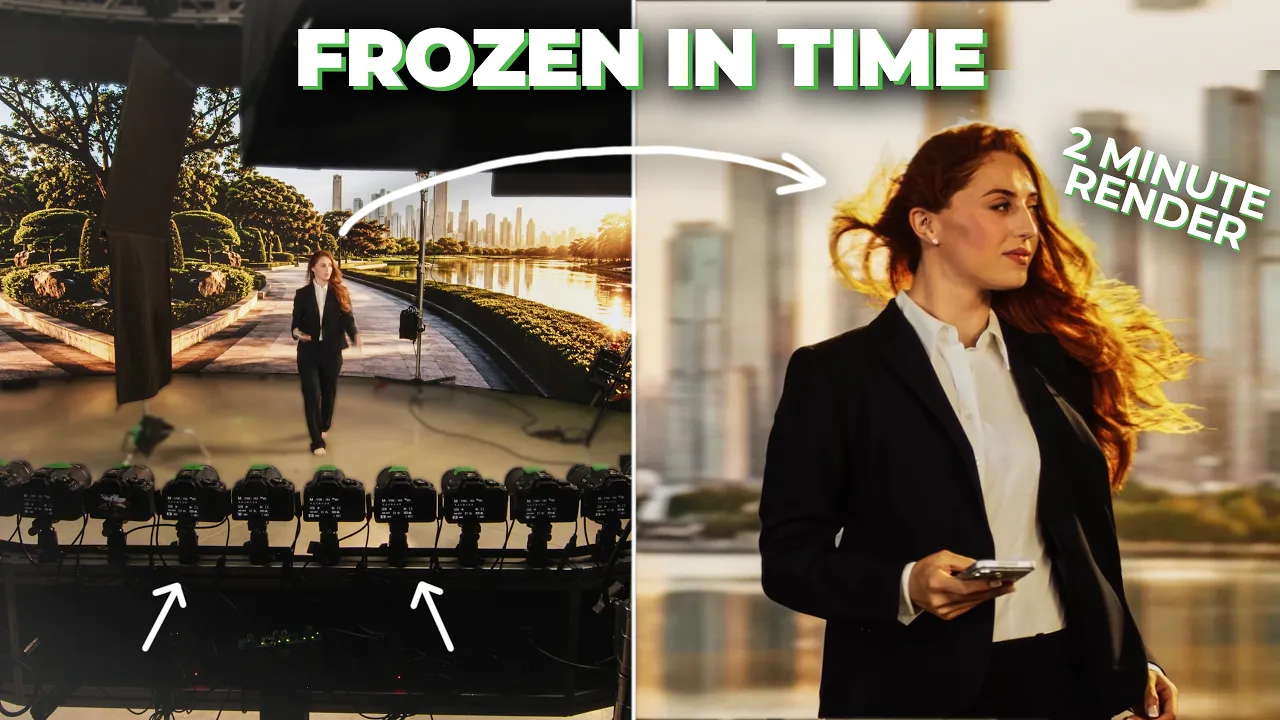
XangleCS can take a captured dataset through registration and training, then turn the result into a deliberate camera move with playback presets and MP4 output. This makes the result much more useful for demos, activations, photobooths, and repeatable production work. See the full demo:
Sharing and delivery
- Offline QR code sharing. Guests can join the local WiFi and download their media without relying on the cloud relay or venue internet.
- Online QR code sharing. Guests can open a relay-hosted delivery page on their phones and download their media directly after the capture.
- No SMTP setup. Sharing and delivery are ready to use without asking the operator to configure an email provider or cloud service.
Built for events and public-facing installations
- Backstage camera. Film the process from the start of the countdown through the capture and after the shot. For reliable saved recordings, use a webcam or HDMI capture source.
- Kiosk mode. Turn the camera rig into a modern self-service photobooth, with an online QR workflow and an offline local mode for supported setups.
- App rebranding. Use your own logo, company name, and colors so the application feels like part of your business.
- Multilingual UI. XangleCS is available in English, French, Spanish, Portuguese, and Chinese, with guest-facing delivery and replay surfaces included in the broader localized workflow.
Relevant links
- Getting started with bullet-time photobooths
- Getting started with large 3D-scan arrays
- Demos of the new XangleCS
This is the version of Xangle Camera Server I wanted to build after using the old system myself for 10 years, and especially after accompanying you through your projects. It is more flexible with hardware, more practical for storage, and much better optimized for fast, high-pressure multi-camera sessions.
Welcome to the new XangleCS.
Eric & team